Configure the Simulation#
Set the map, the date, the weather, the soil, the crops, the vehicle and the graphics. The game takes command-line options. ACRES Core takes the same settings as Python arguments.
Before you start
- For the game: package the game. Refer to Build the Game.
- For Python: set the environment of Use the Python API.
How the Settings Work#
ACRES reads its settings from three places. A later place has priority over an earlier place.
| Place | Example | Scope |
|---|---|---|
Configuration files in Acres/Content/Simulation |
polaris.json, tractor.json, environment.json, farm.json, sensors_polaris.json |
The default of each value |
| The menu of the game | Simulation settings | One session |
| Command-line options and Python arguments | -EnvHour=18.5, crop_date="2026-08-15" |
One session or one batch |
The game copies the files and the options of each session into its session folder. Thus each session is reproducible. The Configuration Files reference gives each key.
A Full Example#
This command starts the Polaris on the map variant acre-mixed, on 20 September at 18:30, in rain under an overcast sky. The crops have the growth of that date.
Packaged/Linux/Acres.sh -VehicleDemo -Vehicle=polaris -MapData=acre-mixed \
    -EnvDate=2026-09-20 -EnvHour=18.5 -EnvClouds=overcast -EnvRain=18,20,6 -EnvWind=6 \
    -CropStage=date -PolarisFinish=forest_green
Expected result
The log confirms the map, the weather and the crops.
ACRES_MAP_DATA ../../../Acres/Content/SimulationMaps/acre-mixed
ACRES_ENVIRONMENT_READY day 1 18:30 | 18.4 C RH 95% | sun 14 deg | cloud 97% | rain 5.0 mm/h (0.0 mm) | wind 5.3 m/s from 225 | vis 2.5 km
ACRES_MAP_DATA changed fields (17): F07 F10 F17 F20 F24 F25 F27 F28 F35 F37 F38 F39 F40 F46 F47 F52 F53
ACRES_CROP_SEASON_PLANTED season=2026 stage=date date=2026-09-20 ...
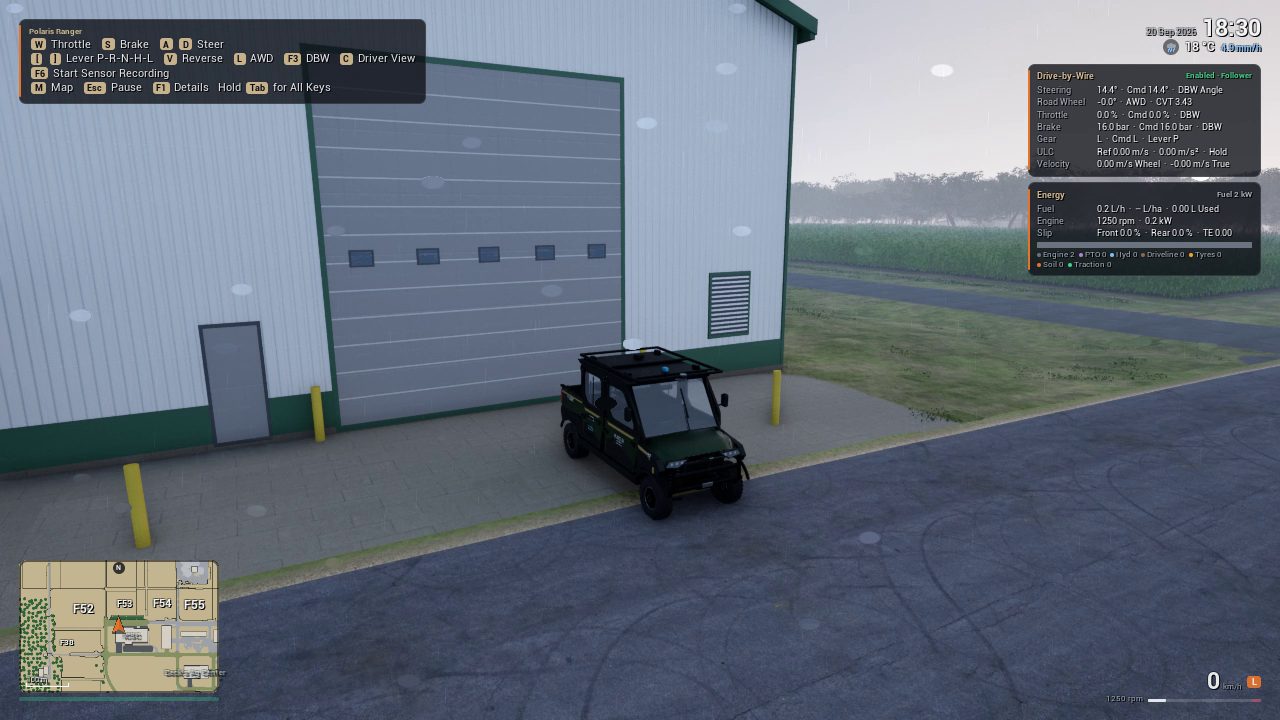
Select a Map#
ACRES has the default map and seven variants. A variant has the same terrain and buildings. A seed changes its fields, lanes, crops and wet patches. Each variant also has new crop kinds, planting dates and harvested fields.
| Map | Merged Fields | Split Fields | Dead Ends | Removed Lanes | One-Gate Fields | Wet Patches |
|---|---|---|---|---|---|---|
default |
0 | 0 | 0 | 0 | 0 | 0 |
acre-merged |
6 | 1 | 0 | 0 | 2 | 2 |
acre-split |
3 | 3 | 1 | 0 | 0 | 3 |
acre-detour |
2 | 1 | 0 | 5 | 3 | 4 |
acre-deadend |
1 | 0 | 4 | 2 | 8 | 1 |
acre-mixed |
4 | 4 | 2 | 3 | 5 | 5 |
acre-sparse |
4 | 0 | 3 | 14 | 12 | 4 |
acre-maze |
2 | 0 | 8 | 8 | 16 | 3 |
The counts come from Learning/acres_learn/configs/map_variants_v1.json. Some variants also move one side of a field.
The Map Data reference shows how to make a new variant from a seed.
Set the Date, the Time and the Weather#
| Option | Unit | Default | Function |
|---|---|---|---|
-EnvDate= |
YYYY-MM-DD |
2026-07-15 |
The start date |
-EnvHour= |
h | 10 | The local start time. 18.5 is 18:30. |
-EnvMinute= |
s | 60 | The real seconds for one minute of game time. 60 is real time. |
-EnvClouds= |
fair |
clear, fair, partly or overcast |
|
-EnvRain= |
h, h, mm | none | One rain event: the start hour, the end hour and the total depth |
-EnvFog= |
m | auto |
auto, off or a fixed visibility |
-EnvWind=, -EnvWindFrom= |
m/s, deg | 3.5, 225 | The mean wind at 10 m and the direction it comes from |
-EnvLowC=, -EnvHighC= |
°C | 16, 28 | The low and the high temperature of the day |
-EnvSeed= |
42 | The seed of the gusts, the clouds and the temperature noise |
The Weather model page explains the sky, the temperature and the rain.
Set the Soil and the Crops#
| Option | Default | Function |
|---|---|---|
-FarmInitialTheta= |
0.5 | The start soil water: 0 is the wilting point, 1 is the field capacity |
-FarmPreDays= |
0 | Runs the farm water model for this number of days before the start |
-CropStage= |
mature |
mature gives full growth. date grows each field from its planting date to the session date. |
-FarmInitialGrowth= |
1 | The growth fraction of all fields, 0 to 1 |
-CropSeason= |
2026 |
The crop map ACRE/crops_<season>.json |
-VehicleSurface= |
mapped |
One surface at all positions, for a test |
-DriveRegion |
off | Adds the 4.6 km regional ground around the tile, with 100 more fields |
In ACRES Core, the same settings are arguments and calls of Batch:
"""Four environments with different settings: dry soil, wet soil, a heavier vehicle, and rain on the regional ground."""
import math

import numpy as np
import acres_core as ac

batch = ac.Batch(".", num_envs=4, drive_region=True, crop_date="2026-08-15")
S = {name: i for i, name in enumerate(ac.STATE_COLUMNS)}

batch.set_conditions([0], global_fraction=0.0)                 # soil water at the wilting point
batch.set_conditions([1], global_fraction=1.3)                 # wet soil, above field capacity
batch.set_parameters([2], {"mass.occupants": 4})               # four persons in the Polaris
batch.set_weather([3], rain_mm_h=20.0, time_scale=60.0)        # rain; 1 s of simulation is 1 min of weather
batch.reset(None, np.tile([-585.0, 75.0, math.pi / 2, 0.0], (4, 1)))   # reset after set_parameters

for _ in range(100):                                           # 10 s at 2 m/s
    state = batch.step_curvature_speed(np.zeros(4), np.full(4, 2.0))
for k, name in enumerate(["dry soil", "wet soil", "4 occupants", "rain"]):
    print(f"{name:12s} distance {state[k, S['y']] - 75.0:5.2f} m, fuel {state[k, S['fuel_used_l']] * 1000:.1f} ml, rear slip {state[k, S['rear_slip']]:.3f}")
Expected result
The wet soil gives more slip and more fuel. The rain changes only the regional ground, thus the environment on the tile field does not change.
The Soil Water and Crops and Ground Classes pages explain these models.
Change the Vehicle Parameters#
| Option | Function |
|---|---|
-Vehicle= |
polaris or maxxum |
-PolarisSet=key=value;key=value |
Changes parameters of the Polaris with the dotted keys of polaris.json |
-PolarisConfig=<file> |
A different parameter file of the Polaris |
-VehicleConfig=<file> |
A different parameter file of the Maxxum, the soil and the implements (tractor.json) |
-PolarisOccupants= |
The number of persons, 0 to 6. One person has 85 kg. |
-PolarisFinish= |
graphite, forest_green, desert_tan or deep_blue |
In ACRES Core, Batch(polaris_overrides={...}) changes the parameters of all environments, and set_parameters(indices, {...}) changes some environments. Use it for domain randomization. The Polaris model page gives the parameters.
Set the Sensors and the Graphics#
| Option | Function |
|---|---|
-PolarisSensorConfig=<file> |
The sensor file of the Polaris |
-RenderTier= |
low, high or auto. auto selects high for a GPU with 11.5 GiB of memory or more. |
-ResX=, -ResY= |
The window or image size |
-RenderOffscreen |
Renders without a window |
-nullrhi |
No rendering at all: the physics and the logs only. The sensors that need rendering do not record. |
The Sensors tutorial gives the sensor settings. The Command-Line Options reference gives each option of the game.
Next Steps#
-
Drive the Polaris and the Maxxum, and run several vehicles.
-
Add traffic, workers and objects on the path.
-
Every option of the game.