Run Several Vehicles#
This tutorial starts the Maxxum and the Polaris in one session. Each vehicle is an agent with its own controls, ports, sensors and logs.
Before You Start#
- Build the packaged game. Refer to Build the Game.
- Do First Drive and First Recorded Dataset.
- Use Python 3 for the client of the worked example. The client uses only the standard library.
All agents of a session use the same world, the same farm and the same weather. A session can have 8 agents at most. Agent 0 is the vehicle that the player controls first.
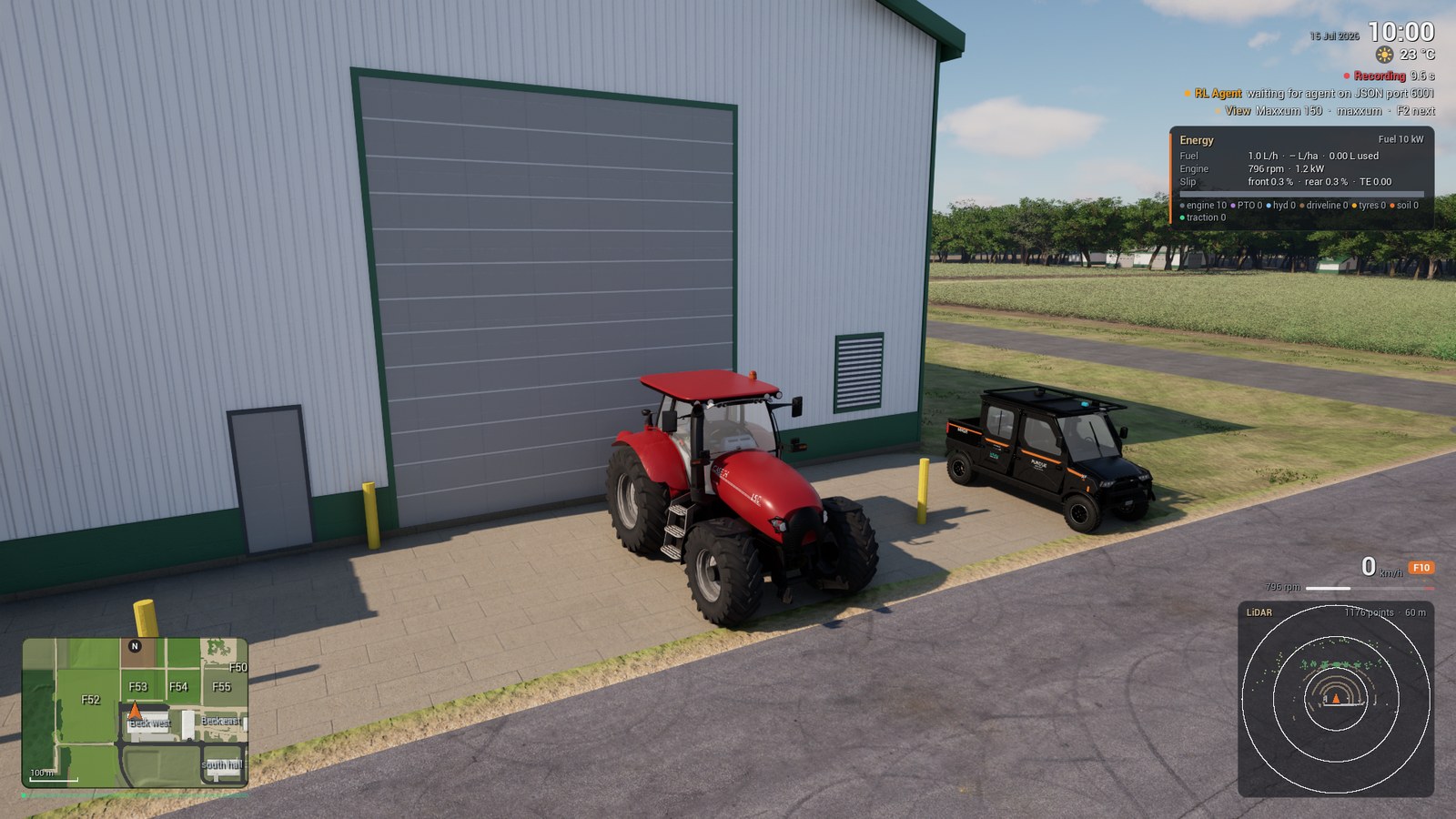
Start Two Vehicles#
-
Start a session with the option
-Vehicles=.Expected Result
The Maxxum is in front of the ICSC garage. The Polaris is 7 m to its left. The log contains one line
ACRES_VEHICLE_READYfor each agent. -
Push F2 to go to the next vehicle. The keyboard, the camera and the HUD follow.
Expected Result
The HUD shows the line
Viewwith the name of the vehicle. The log contains the lineACRES_VIEW agent=polaris.Note
The vehicle that you leave holds its brake. A bridge client, a replay or a drive script continues to drive it.
The game gives each agent a name. The default name is the vehicle type: maxxum or polaris.
A name that occurs two times gets the agent number as a suffix, for example polaris_2.
An entry of -Vehicles= can contain a start pose.
| Entry | Pose |
|---|---|
polaris |
No pose. The agent starts 7 m to the right of agent 0 with the same heading. When that place is not clear, the game uses the left side. |
polaris@533:470:-90 |
The cell u, v of the survey grid and the Unreal yaw angle in degrees. |
polaris@utm:500577.5:4480144.6:0 |
The UTM zone 16N easting and northing in metres and the heading in degrees, clockwise from grid north. |
Note
The menu starts the same session: select New Simulation, the tab Vehicle and the value Both (Maxxum and Polaris, Multi-Agent).
Give Each Agent Its Ports#
Each agent can have a vehicle bridge and a sensor stream. A list option gives one port for each agent, in the sequence of the agents.
-
Start the session with the port lists and the recordings.
Packaged/Linux/Acres.sh -VehicleDemo -RenderOffscreen -Vehicles=maxxum,polaris \
  -RlPorts=5555,5556 -SensorStreams=5601,5602 -SimControl=5600 \
  -SensorRecord -SessionLog -VehicleOutput="$PWD/out/two" -DriveScript="$PWD/two.json"
The file
two.jsonholds the Maxxum and ends the session after 24 s.Expected Result
The game opens one port of each type for each agent. It stops after the drive script ends.
ACRES_SENSOR_STREAM_LISTENING agent=maxxum port=5601
ACRES_RL_LISTENING port=5555
ACRES_SENSOR_STREAM_LISTENING agent=polaris port=5602
ACRES_RL_LISTENING port=5556
ACRES_AGENT_SPAWNED index=1 name=polaris vehicle=polaris
ACRES_SIM_CONTROL_READY port=5600 lockstep=0 replay=0 log=
ACRES_DRIVE_SCRIPT_DONE t=24.00
| Option | Function |
|---|---|
-RlPorts=5555,5556 |
The port of the vehicle bridge of each agent. |
-SensorStreams=5601,5602 |
The port of the sensor stream of each agent. |
-SimControl=5600 |
The simulator control channel. One channel controls the session with all agents. |
-SensorRecord |
Records the sensors of all agents. |
-SessionLog |
Writes the session log of all agents. |
-DriveScript= |
The drive script of agent 0. |
The options -RlPort=, -SensorStream=, -Implement=, -ReplayFile= and -DriveScript= apply to agent 0 only.
Use an agents file to set these values for the other agents.
Find the Logs of Each Agent#
A session with more than one agent writes one folder for each agent into the session folder.
-
List the session folder.
Expected Result
out/two:
farm-config.json  farm-fields.csv    farm-water.bin    maxxum     water-depth.f32
farm-events.csv   farm-state.json    farm-water.json   polaris
farm-field.bin    farm-visuals.json  farm-weather.csv  theta.f32

out/two/maxxum:
sensors  session-summary.json  tractor.csv

out/two/polaris:
dbw.csv  sensors  session-summary.json  tractor.csv
| Path | Content |
|---|---|
<session>/<agent>/tractor.csv |
The session log of the agent at 120 Hz. |
<session>/<agent>/session-summary.json |
The summary of the session log. |
<session>/polaris/dbw.csv |
The drive-by-wire reports of the Polaris at 50 Hz. |
<session>/<agent>/sensors/episode-NNN |
The sensor episodes of the agent. |
<session>/farm-* |
The state of the farm. All agents use one farm. |
With -SensorOutput=<folder>, the sensor episodes of an agent go into <folder>/<agent>.
The session folder of this run uses 346 MB for 24 s.
CAUTION
Two vehicles that record a camera and a LiDAR in real time lose samples. In this run the game made 5 frames
for each second. Each vehicle recorded 134 of 240 camera images and approximately 70 of 240 LiDAR scans.
Read the drop counters of episode.json. Use lockstep when the dataset must be complete.
Refer to Collect Data and Lockstep Stepping.
A drive script ends the session only while the player controls agent 0.
When a key view moved the view to a different agent, move the view back before the key exit.
Write an Agents File#
The option -Agents= reads the agents from a JSON file. The file has more settings than -Vehicles=.
-
Write the file
agents.json.{"agents": [ {"name": "maxxum", "vehicle": "maxxum", "implement": "chisel_plow", "spawn": [625, 477, 180], "drive_script": "/home/user/ACRES/Demo/Multi/maxxum.json", "rl_port": 5555, "sensor_overlay": "/home/user/ACRES/Demo/Multi/maxxum_sensors.json"}, {"name": "polaris", "vehicle": "polaris", "finish": "desert_tan", "utm": [500577.540, 4480144.643, 0.054], "utm_frame": "nad83_2011", "rl_port": 5556, "drive_script": "/home/user/ACRES/Demo/Multi/polaris.json"} ]} -
Replace
/home/user/ACRESwith the absolute path of the repository.
The keys of an agent have these functions. For agent 0, an option of the command line sets the value when the key is absent.
| Name | Type | Unit | Default | Description |
|---|---|---|---|---|
name |
string | the vehicle type | The name of the agent in the logs, the folders, the HUD and the bridge messages. | |
vehicle |
string | maxxum |
maxxum or polaris. Option for agent 0: -Vehicle=. |
|
finish |
string | graphite |
The paint of the Polaris: graphite, forest_green, desert_tan or deep_blue. Option: -PolarisFinish=. |
|
implement |
string | none |
The implement of the Maxxum. Option: -Implement=. |
|
spawn |
array | cell, cell, deg | The start pose [u, v, yaw] on the survey grid. Options: -VehicleSpawnU=, -VehicleSpawnV=, -VehicleSpawnYaw=. |
|
utm |
array | m, m, deg | The start pose [easting, northing, heading] in UTM zone 16N. The heading is clockwise from grid north. |
|
utm_frame |
string | nad83_2011 |
The datum of the UTM pose: nad83_2011 or wgs84. |
|
drive_script |
path | The drive script of the agent. Option: -DriveScript=. |
||
replay_file |
path | A replay file or a session folder. Option: -ReplayFile=. |
||
replay_mode |
string | commands |
commands or path. Option: -ReplayMode=. |
|
rl_port |
number | 0 | The port of the vehicle bridge. Options: -RlPort=, -RlPorts=. |
|
sensor_stream |
number | 0 | The port of the sensor stream. Options: -SensorStream=, -SensorStreams=. |
|
can_udp |
number | 0 | The UDP port of the CAN frames of the agent. Option for agent 0: -RlCanUdp=. |
|
gear |
number | The start gear of the Maxxum. Option: -VehicleGear=. |
||
sensor_record |
boolean | the value of -SensorRecord |
Records the sensors of this agent. | |
sensor_overlay |
path | A JSON file that changes values of sensors.json for this agent. |
Note
A value of rl_port or sensor_stream in the file has priority over the list options -RlPorts= and
-SensorStreams=.
Run the Worked Example#
The example has two vehicles at work. The Maxxum pulls the chisel plow on field F29 with a drive script. The Polaris follows the grass lanes at the edge of the field. A client drives it through its vehicle bridge with drive-by-wire commands.
-
Start the session with the agents file.
-
Start the client of the Polaris in a second terminal.
-
Wait until the drive script of the Maxxum ends the session after 80 s. Then list the session folder.
Expected Result
out/multi:
farm-config.json  farm-fields.csv    farm-water.bin    maxxum     water-depth.f32
farm-events.csv   farm-state.json    farm-water.json   polaris
farm-field.bin    farm-visuals.json  farm-weather.csv  theta.f32

out/multi/maxxum:
sensors  session-summary.json  tractor.csv

out/multi/polaris:
dbw.csv  sensors  session-summary.json  tractor.csv
In this run the Maxxum moved 222 m and the Polaris moved 189 m. The session folder uses 1.5 GB.
The Maxxum records no camera in this example: the file Demo/Multi/maxxum_sensors.json sets its camera off.
The Polaris recorded 800 of 800 camera images and 557 of 801 LiDAR scans.
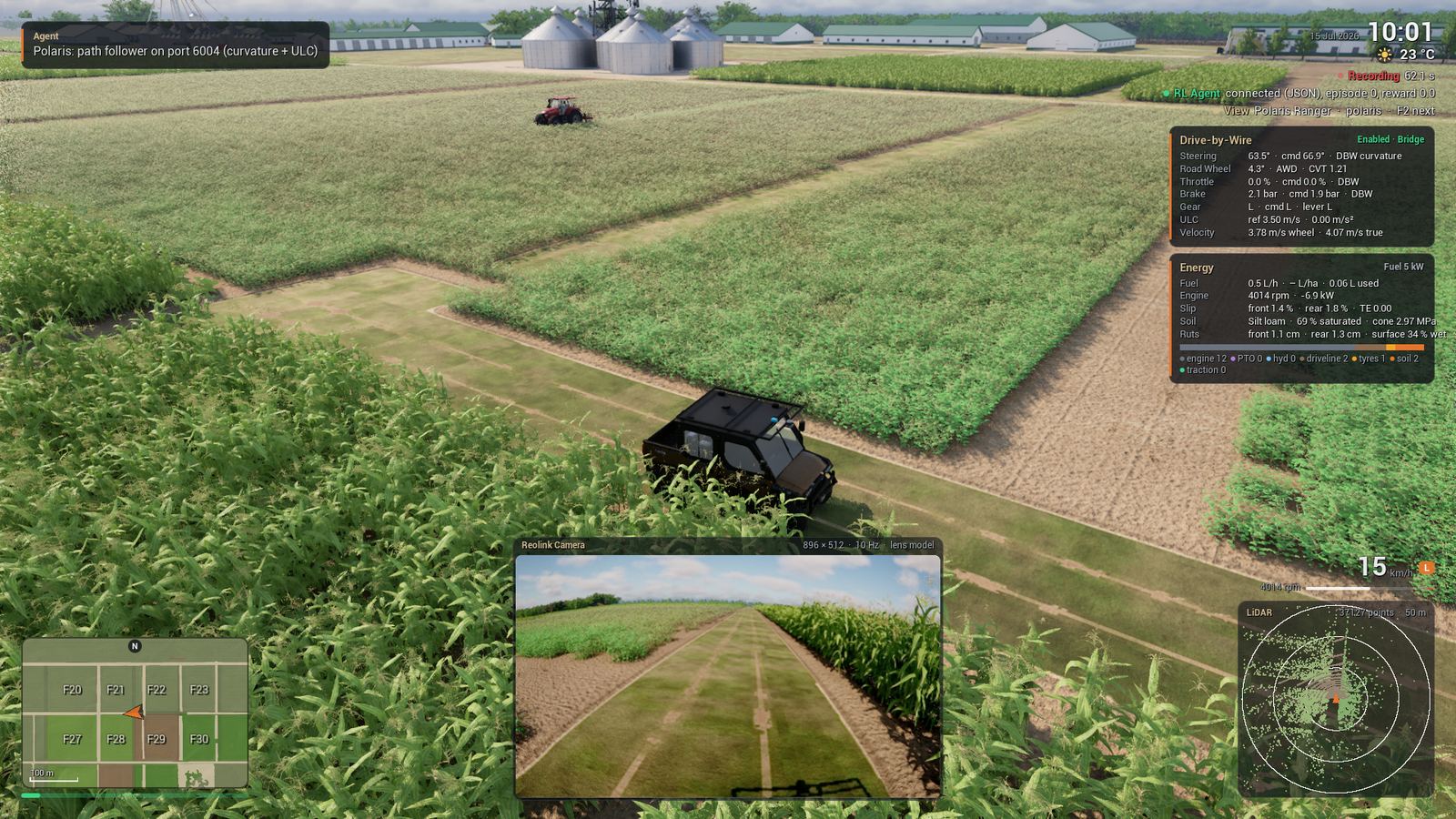
The drive script of agent 0 can move the view between the agents. The key view gives the name of the agent.
Note
The physics does a maximum of 0.1 s in one frame (MaxPhysicsDeltaTime in Acres/Config/DefaultEngine.ini).
The simulation thus stays at real time down to 10 frames for each second. Below that rate, the simulation time
is slower than the clock time. The session of this example made approximately 26 frames for each second.
The script Demo/multi_agent_demo.sh starts the game and the client with one command. It writes its own agents file.
CAUTION
The agents file of the script has no key spawn for the Maxxum. The Maxxum then starts at the ICSC garage
and does not get to field F29: in a test it stopped after 15 m. Use the agents file of this page, or add
"spawn": [625, 477, 180] to the Maxxum in the script.
Connect the Agents to ROS 2#
The ROS 2 bridge connects all agents of a session from one process. It reads the agents and their ports from the simulator control channel.
WARNING
Do not send drive-by-wire commands outside the DDS loopback fence. The real vehicle can move.
Do all ROS 2 commands in a terminal with the fence (source ROS/Env/setup_env.sh).
-
Start the session of the section Give Each Agent Its Ports.
-
Start the bridge in a second terminal.
source ROS/Env/setup_env.sh
ros2 launch acres_sim sim_bridge.launch.py agents:=auto control_port:=5600 vehicle:=maxxum
Expected Result
The bridge prints one line for each agent.
-
List the topics in a third terminal.
Expected Result
The list contains the topics of the Maxxum in the root namespace and the topics of the Polaris in the namespace
/polaris. These are some of the topics.
Agent 0 uses the root namespace. Each other agent uses a namespace with its name and a frame prefix with its name.
Only agent 0 publishes /clock. The argument vehicle:=maxxum tells the launch file that agent 0 is the Maxxum.
Nodes and Launch Files describes the arguments of the launch file.
First ROS 2 Session gives the procedure for one vehicle.
Next Steps#
- Collect Data: record the two vehicles in one session.
- Drive the Polaris Ranger: the keys and the drive-by-wire of the Polaris.
- Vehicle Bridge: the messages of the port of
-RlPort=. - Command-Line Options: all options.